Parameterized videos
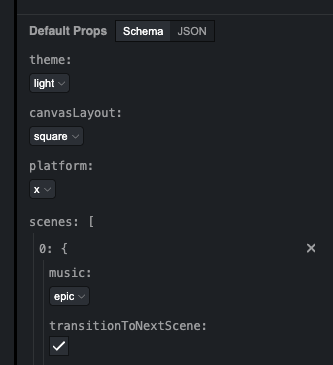
Remotion allows for ingesting, validating, visually editing, and transforming data that may be used to parametrize a video.
Data may influence the content of the video, or the metadata such as width, height, duration or framerate.
Table of contents
High-level overview
Remotion allows the passing of props to a React component.
Props are a React concept and take the shape of a JavaScript object.
To determine the data which gets passed to the video, the following steps are taken:
1 Default props are defined statically, so that the video can be designed in the Studio without any data.
The default props define the shape of the data.
A schema can be defined and validated.
In absence of data, default props can be edited in the Remotion Studio. Basic controls are inferred from their values.
2 Input props may be specified when rendering a video to override the default props.
Remotion shallowly merges input props with default props, and input props take priority. If the composition has a schema, Remotion validates the merged props during rendering.
3 Using calculateMetadata(), postprocessing of the props may be performed and metadata be dynamically calculated.
For example, given a URL is passed as a prop, it may be fetched and the content added to the props.
Asynchronous calculation of the video duration and other metadata is also possible here.
4 The final props are passed to the React component.
The component may dynamically render content based on the props.
See here for a visual explanation and more details of how the resolution process works.
See also
You can use the Remotion Player to display a Remotion component in a React app and dynamically change the content without rendering the video, to create experiences where the content updates in real-time.